The HDR features allow you to enable an HDR mode for specific uEye+ camera. The computed HDR image is displayed directly in the camera window.
Click  in the tool menu to open the dialog.
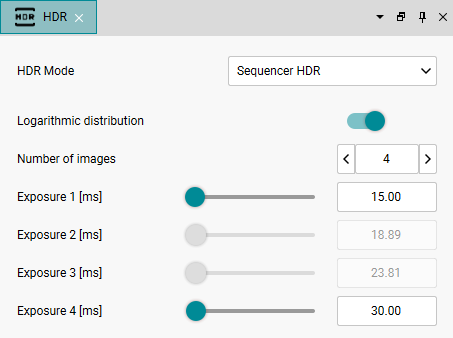
Fig. 255: HDR settings for Sequencer HDR
HDR mode
Depending on your camera model, select an HDR mode from the “HDR mode” list:
|
Note: The settings for the HDR features are not automatically restored when reconnecting. |

Sequencer HDR can be used with all uEye+ cameras that support the sequencer. After selecting Sequencer HDR, there are the following settings:
•Logarithmic distribution
If you disable the option, you can set the exposure time of each image in the sequence. If you enable the option, you only specify the exposure time of the first and last image. The further exposure times are automatically distributed logarithmically.
•Number of images
Specifies the number of images in the sequence (2 ... 10).
•Exposure time 1 ... 10 (depending on the number of images)
Here, you define the exposure time of each image in the sequence.
Clear HDR is only supported by specific uEye+ cameras. A special UserSet is loaded for this (see UserSetSelector). After selecting Clear HDR, there are the following settings:
•Exposure
Set the exposure time using the slider or enter the value directly in the input field behind the slider. Note that the displayed maximum value for the exposure time depends on the opened camera model and its settings.
•Gain low
Here, you define the gain factor for the analog low channel. This is the gain setting of the low-gain image parts (see GainSelector "AnalogLow").
•Gain high
Here, you define the gain factor for the analog high channel. This is the gain setting of the high-gain image parts (see GainSelector "AnalogHigh").
Quad HDR is only supported by specific uEye+ cameras. A special UserSet is loaded for this (see UserSetSelector). After selecting Quad HDR, there are the following settings:
•Exposure 1 …4
Set the 4 different exposure times of the sensor using the sliders or enter the values directly into the input fields behind the sliders.
See the notes on Quad HDR in the application notes of the models: