Selects the user set that has to be loaded, saved or configured. User sets do not include the LUT settings.
Name |
UserSetSelector |
Category |
|
Interface |
Enumeration |
Access |
Read/Write |
Unit |
- |
Visibility |
Beginner |
Values |
ClearHDR Default HighSpeed Linescan LinescanHighSpeed LongExposure QuadHDR Uar750QuadVga Uar860QuadVga Uar1250QuadVga Uar1500QuadVga Uar2000QuadVga Uar3000QuadVga Uar6000Vga Uar7500Vga UserSet0 UserSet1 |
Standard |
SFNC |
Availability uEye+ |
|
Availability uEye |
|


Values description
•ClearHDR: Selects the ClearHDR user set. In ClearHDR mode, two sub-images are captured with different gain settings in sequential acquisition (see GainSelector: "AnalogHigh" and "AnalogLow"). The sensor outputs both sub-images stitched together vertically as one frame with double height.
> Sets the SensorOperationMode to "ClearHDR". This feature is only supported by specific uEye+ cameras (GV and U3 models).
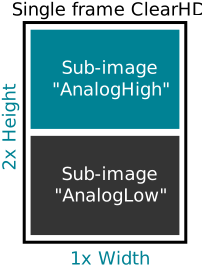
Fig. 233: Frame in ClearHDR mode
•Default: Selects the default setting. Loading the user set "Default" guarantees a state where a continuous acquisition is started that uses only the mandatory features. It is compatible with the most applications.
> Sets the SensorOperationMode to "Default".
•HighSpeed: Selects the "HighSpeed" user set. The HighSpeed mode allows higher frame rates, but the image quality is not quite as good as in the default mode. This feature is only supported by the following cameras: U3-313x, U3-314x, U3-316x, U3-318x.
> Sets the SensorOperationMode to "Default".
•Linescan: Selects the "Linescan" user set. It is the optimized setting for line scan mode without line loss. The exposure time is set to its minimum. Onboard Debayering is not available. The scan line is vertically centered and the default image height is set to 1024. The SensorHeight defines the height of the scan line and is set to "1" for monochrome cameras and "2" for color cameras.
> Sets the SensorOperationMode to "Linescan". Depending on the further camera settings it may be necessary to increase the value of FrameAbortTimeout to avoid incomplete images. This feature is only supported by uEye+ cameras (GV and U3 models).
•LinescanHighSpeed: Selects the "LinescanHighSpeed" user set. It is the speed optimized setting for line scan mode and only available for monochrome cameras. Lines may be lost between two frames. The exposure time is set to its minimum. Onboard Debayering is not available. The scan line is vertically centered and the default image height is set to 1024. The SensorHeight defines the height of the scan line and is set to "1"
> Sets the SensorOperationMode to "LinescanSensor". This feature is only supported by the following monochrome cameras: GV-524x, GV-525x.
•LongExposure: Selects the "LongExposure" user set. It is the optimized setting for long exposure mode. The PixelFormat is set to a bit depth higher than 8 bit, if available, and the source gain of the sensor is adjusted.
> Sets the SensorOperationMode to "LongExposure". This feature is only supported by uEye+ cameras (GV and U3 models).
•QuadHDR: Selects the QuadHDR user set. In QuadHDR mode, the sensor uses a 4-pixel pattern to capture four sub-images with different exposure times (see ExposureTimeSelector). The sensor outputs the data from all four sub-images as one frame, with each sub-image having only a quarter of the resolution.
> Sets the SensorOperationMode to "QuadHDR". This feature is only supported by specific uEye+ cameras (GV and U3 models).
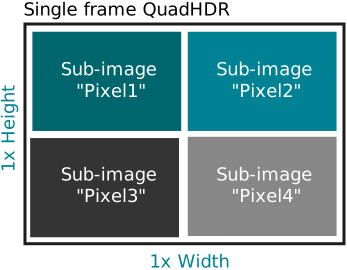
Fig. 234: Frame in QuadHDR mode
•Uar750QuadVga: Selects the user defined setting "Uar750QuadVga" (single frequency with 200 MHz) with a measuring range of 750 mm and a resolution of 1280 x 960 pixels. The depth resolution is represented in Scan3dCoordinateScale. Refer to the datasheet for more information on accuracy and precision.
> Sets the SensorOperationMode to "TofSingleFrequency200Mhz". This feature is only supported by uEye 3D cameras.
•Uar860QuadVga: Selects the user defined setting "Uar860QuadVga" (single frequency with 175 MHz) with a measuring range of 860 mm and a resolution of 1280 x 960 pixels. The depth resolution is represented in Scan3dCoordinateScale. Refer to the datasheet for more information on accuracy and precision.
> Sets the SensorOperationMode to "TofSingleFrequency175Mhz". This feature is only supported by uEye 3D cameras.
•Uar1250QuadVga: Selects the user defined setting "Uar1250QuadVga" (single frequency with 120 MHz) with a measuring range of 1250 mm and a resolution of 1280 x 960 pixels. The depth resolution is represented in Scan3dCoordinateScale. Refer to the datasheet for more information on accuracy and precision.
> Sets the SensorOperationMode to "TofSingleFrequency120Mhz". This feature is only supported by uEye 3D cameras.
•Uar1500QuadVga: Selects the user defined setting "Uar1500QuadVga" (single frequency with 100 MHz) with a measuring range of 1500 mm and a resolution of 1280 x 960 pixels. The depth resolution is represented in Scan3dCoordinateScale. Refer to the datasheet for more information on accuracy and precision.
> Sets the SensorOperationMode to "TofSingleFrequency100Mhz". This feature is only supported by uEye 3D cameras.
•Uar2000QuadVga: Selects the user defined setting "Uar2000QuadVga" (single frequency with 75 MHz) with a measuring range of 2000 mm and a resolution of 1280 x 960 pixels. The depth resolution is represented in Scan3dCoordinateScale. Refer to the datasheet for more information on accuracy and precision.
> Sets the SensorOperationMode to "TofSingleFrequency75Mhz". This feature is only supported by uEye 3D cameras.
•Uar3000QuadVga: Selects the user defined setting "Uar3000QuadVga" (single frequency with 50 MHz) with a measuring range of 3000 mm and a resolution of 1280 x 960 pixels. The depth resolution is represented in Scan3dCoordinateScale. Refer to the datasheet for more information on accuracy and precision.
> Sets the SensorOperationMode to "TofSingleFrequency50Mhz". This feature is only supported by uEye 3D cameras.
•Uar6000Vga: Selects the user defined setting "Uar6000Vga" (dual frequency with 175 + 200 MHz) with a measuring range of 6000 mm and a resolution of 640 x 480 pixels. The depth resolution is represented in Scan3dCoordinateScale. Refer to the datasheet for more information on accuracy and precision.
> Sets the SensorOperationMode to "TofDualFrequency175Mhz200Mhz". This feature is only supported by uEye 3D cameras.
•Uar7500Vga: Selects the user defined setting "Uar7500Vga" (dual frequency with 100 + 120 MHz) with a measuring range of 7500 mm and a resolution of 640 x 480 pixels. The depth resolution is represented in Scan3dCoordinateScale. Refer to the datasheet for more information on accuracy and precision.
> Sets the SensorOperationMode to "TofDualFrequency100Mhz120Mhz". This feature is only supported by uEye 3D cameras.
•UserSet0: Selects the user defined setting "UserSet0".
•UserSet1: Selects the user defined setting "UserSet1". This feature is only supported by uEye+ cameras (GV and U3 models).
|
Loading a user set can affect the availability and behavior of multiple camera features. The following parameters are only available if a user set for SensorOperationMode "Linescan" has been loaded: •"LineTrigger" and "LineTriggerMissed" signals as source for timers and counters at the features TimerTriggerSource, CounterTriggerSource, CounterEventSource and CounterResetSource. •"FrameActive" as source for the PWM and output lines at the features PWMTriggerSource and LineSource. •AcquisitionLineRate for acquisitions with untriggered lines. •TriggerSelector values "LineStart" and "FrameStart". The SensorOperationMode "Linescan" is subject to the following restrictions: •ExposureAuto and GainAuto are not available. •BinningHorizontal and BinningVertical are not available. •DecimationVertical is not available. •Debayered PixelFormats "RGB8", "BGR8", "RGB10p32" and "BGR10p32" are not available. •TriggerSelector is limited to the values "LineStart" and "FrameStart". |

Code example
C++
// Determine the current entry of UserSetSelector
std::string value = nodeMapRemoteDevice->FindNode<peak::core::nodes::EnumerationNode>("UserSetSelector")->CurrentEntry()->SymbolicValue();
// Get a list of all available entries of UserSetSelector
auto allEntries = nodeMapRemoteDevice->FindNode<peak::core::nodes::EnumerationNode>("UserSetSelector")->Entries();
std::vector<std::shared_ptr<peak::core::nodes::EnumerationEntryNode>> availableEntries;
for(const auto & entry : allEntries)
{
if ((entry->AccessStatus()!=peak::core::nodes::NodeAccessStatus::NotAvailable)
&& (entry->AccessStatus()!=peak::core::nodes::NodeAccessStatus::NotImplemented))
{
availableEntries.emplace_back(entry);
}
}
// Set UserSetSelector to "Default"
nodeMapRemoteDevice->FindNode<peak::core::nodes::EnumerationNode>("UserSetSelector")->SetCurrentEntry("Default");
C#
// Determine the current entry of UserSetSelector
string value = nodeMapRemoteDevice.FindNode<IDSImaging.Peak.API.Core.Nodes.EnumerationNode>("UserSetSelector").CurrentEntry().SymbolicValue();
// Get a list of all available entries of UserSetSelector
allEntries = nodeMapRemoteDevice.FindNode<IDSImaging.Peak.API.Core.Nodes.EnumerationNode>("UserSetSelector").Entries();
List<string> availableEntries = new List<string>();
for(int i = 0; i < allEntries.Count(); ++i)
{
if ((allEntries[i].AccessStatus() != IDSImaging.Peak.API.Core.Nodes.NodeAccessStatus.NotAvailable)
&& (allEntries[i].AccessStatus() != IDSImaging.Peak.API.Core.Nodes.NodeAccessStatus.NotImplemented))
{
availableEntries.Add(allEntries[i].SymbolicValue());
}
}
// Set UserSetSelector to "Default"
nodeMapRemoteDevice.FindNode<IDSImaging.Peak.API.Core.Nodes.EnumerationNode>("UserSetSelector").SetCurrentEntry("Default");
Python
# Determine the current entry of UserSetSelector (str)
value = nodeMapRemoteDevice.FindNode("UserSetSelector").CurrentEntry().SymbolicValue()
# Get a list of all available entries of UserSetSelector
allEntries = nodeMapRemoteDevice.FindNode("UserSetSelector").Entries()
availableEntries = []
for entry in allEntries:
if (entry.AccessStatus() != ids_peak.NodeAccessStatus_NotAvailable
and entry.AccessStatus() != ids_peak.NodeAccessStatus_NotImplemented):
availableEntries.append(entry.SymbolicValue())
# Set UserSetSelector to "Default" (str)
nodeMapRemoteDevice.FindNode("UserSetSelector").SetCurrentEntry("Default")