Click  in the tool menu to open the dialog.
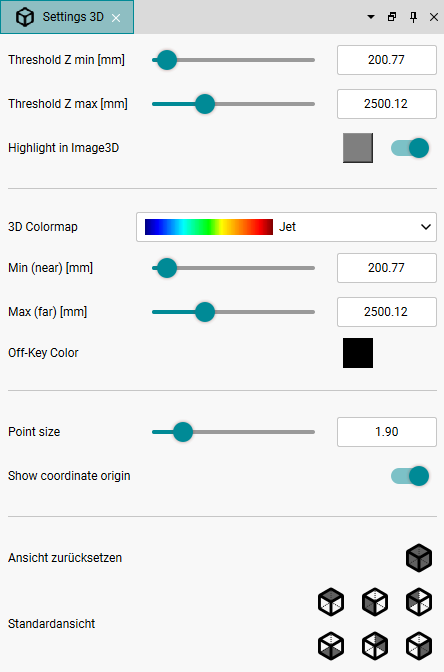
Fig. 257: "Settings 3D" dialog
Threshold Z
•Use "Threshold Z min" and "Threshold Z max" to define the range that is relevant for the evaluation.
•With “Highlight in Image3D,” you can highlight areas in the "Image3D" view with the selected color that are not within the defined “Threshold Z” values.
3D Colormap
•The selection under "3D Colormap" has an effect on the views "Image3D" or "3DView" of the "Range" image component (see Host features dialog). If you want to change the display of "Image2D" or "Confidence", use the settings in the Host features dialog.
•Use "Min (near)" and "Max (far)" to define the area that is relevant for the colormap.
•With "Off-key color", you can highlight areas in the view “Image3D” or “3DView” with the selected color that are not within the defined “Min (near)/Max (far)” values.
Point size
•Use the "Point size" option to specify the point size of the 3D point cloud.
•With the "Show coordinate origin" option, you display the coordinate origin on the image in the "3DView" view.
3D standard views
In the "3DView" view, you can rotate or pan the 3D display as desired. You can also use predefined standard views.
|
Unlike the general operation of the display in the camera window (see Scaling and panning the display), you can zoom directly in the “3DView” view using the mouse wheel and rotate the 3D view using the right mouse button. Use the left mouse button to pan the view. You set the default views in the Settings 3D dialog. |

•Click  to reset the view.
•You can switch between predefined 3D standard views using the icons below.
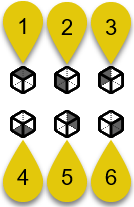
Fig. 258: Settings 3D" dialog - views
Number |
Description |
|---|---|
1 |
Switch to top view (XY plane) |
2 |
Switch to front view (XZ plane) |
3 |
Switch to view from the left (YZ plane) |
4 |
Switch to the bottom view (XY plane) |
5 |
Switch to rear view (XZ plane) |
6 |
Switch to view from the right (YZ plane) |